

Key takeaways
- Most of the risk in an Odoo project is decided before anyone configures anything: in how clearly the requirements are written.
- For TAM Trading, we wrote a business requirements document and a software requirements specification for each area: Sales, Operations, Supply Chain, Finance and HR. Together they hold 211 numbered requirements.
- Every requirement has an ID, a priority and a status. Hard rules come with a worked example, so the client and the developers read the rule the same way.
- Anything the client had not decided was recorded as an open decision instead of being guessed. The Finance specification alone has 25.
- After sign-off, delivery runs in two-week sprints, followed by data migration, training and testing, go-live and support. New requests go through a change request.
Overview
TAM Trading is a chemical trading and distribution business with three entities, selling across five GCC markets. The scope covers sales, procurement, inventory, logistics, finance and HR on Odoo Enterprise, in one multi-company database.
Between November 2025 and January 2026, we worked with TAM’s teams to document how the business should run in Odoo. This article explains how we did that, and what happens after the requirements are signed off. It is about our method, not about results. We use the same method in manufacturing; see how we mapped a packaging manufacturer.
Decide the business rules before the system rules
An ERP project forces decisions that a manual business can leave vague. Before anything is configured, someone has to decide how each of these should work:
| Business activity | Without agreed rules | With agreed rules in Odoo |
|---|---|---|
| Customer onboarding | Sales creates customers directly | Approval workflow before the customer is active |
| Purchase approval | A manager approves by email | Approval levels based on value or margin |
| Stock allocation | Whoever updates the spreadsheet first gets the stock | The system allocates by agreed rules |
| Shipment release | The warehouse decides | Released only when payment and documents are in place |
| Vendor payment | Finance checks several files | Payment follows a set validation path |
Odoo can enforce most of these. It cannot decide them for you. That is what the requirements stage is for.
Step 1: talk to the people doing the work
We held question-and-answer sessions with each department. The Finance requirements, for example, came from discussions with TAM’s finance team. We started from TAM’s own RFQ-to-payment flowchart and existing forms, including the pre-sales review form TAM-F-004.
The aim at this stage is to understand the current process, including the parts that work. Keep what is useful, then add the controls that are missing.
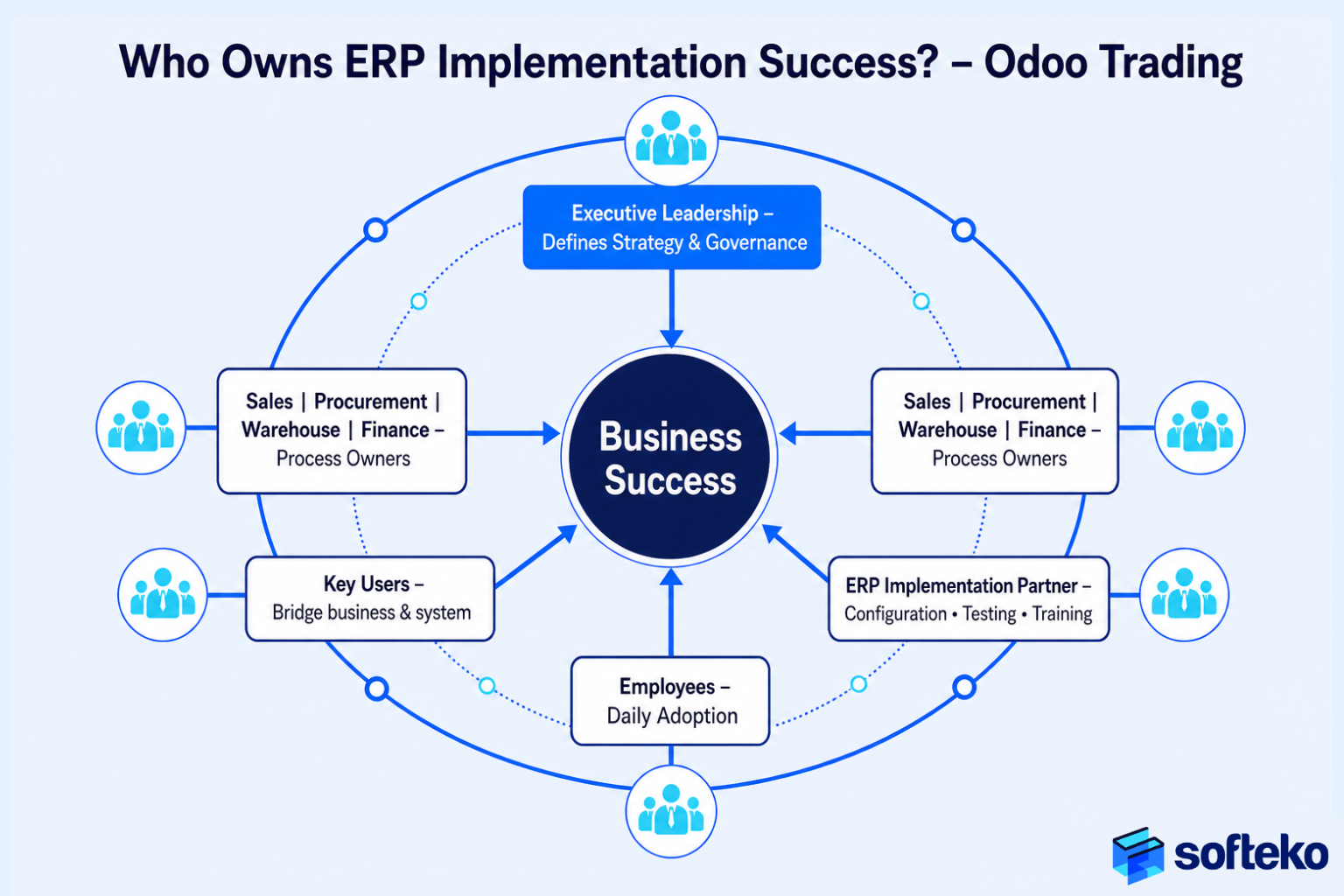
Every group has a part to play:
| Activity | Management | Department heads | Key users | Implementation partner |
|---|---|---|---|---|
| Set business objectives | Leads | |||
| Document current processes | Leads | Supports | Supports | |
| Design future workflows | Approves | Leads | Supports | Leads |
| Configure Odoo | Leads | |||
| Test business scenarios | Leads | Leads | Supports | |
| Train users | Sponsors | Supports | Leads | Delivers |
| Approve go-live | Decides | Recommends | Recommends |
What a requirements session looks like
Each session covers one department and lasts two to three hours. A typical agenda:
- The department walks through its current process, using real documents from recent deals.
- We note where information comes from, who approves what, and where things are delayed or retyped.
- We ask about exceptions: what happens when a customer pays late, a supplier ships short, or a document is missing.
- We list decisions the department cannot make alone, and who should make them.
Bring real documents: a recent quotation, purchase order, delivery note, invoice and any spreadsheet the team uses daily. They show the data the business actually relies on, which is often different from what a process chart says.
Step 2: one requirements set per business area
For each area, we wrote two documents:
- A business requirements document (BRD) in business language: objectives, scope, the process, KPIs, roles and a sign-off page.
- A software requirements specification (SRS) for the build: purpose, what is in and out of scope, definitions, user roles, assumptions and constraints, numbered functional requirements, non-functional requirements, links to other Odoo modules, process flows and an Odoo module mapping.
| Area | Numbered requirements |
|---|---|
| Operations | 57 |
| Supply Chain | 53 |
| HR | 40 |
| Finance | 33 |
| Sales | 28 |
| Total | 211 |
These counts come from the functional requirement IDs in each specification. For sales, that set covers the path described in one deal record.
The Sales specification groups its requirements into eight areas: customer master and governance, leads and enquiries, pre-sales review, costing and approvals, sales contracts, quotations and proformas, documents and execution, and targets and commission.
Step 3: write requirements people cannot misread
Two habits matter most.
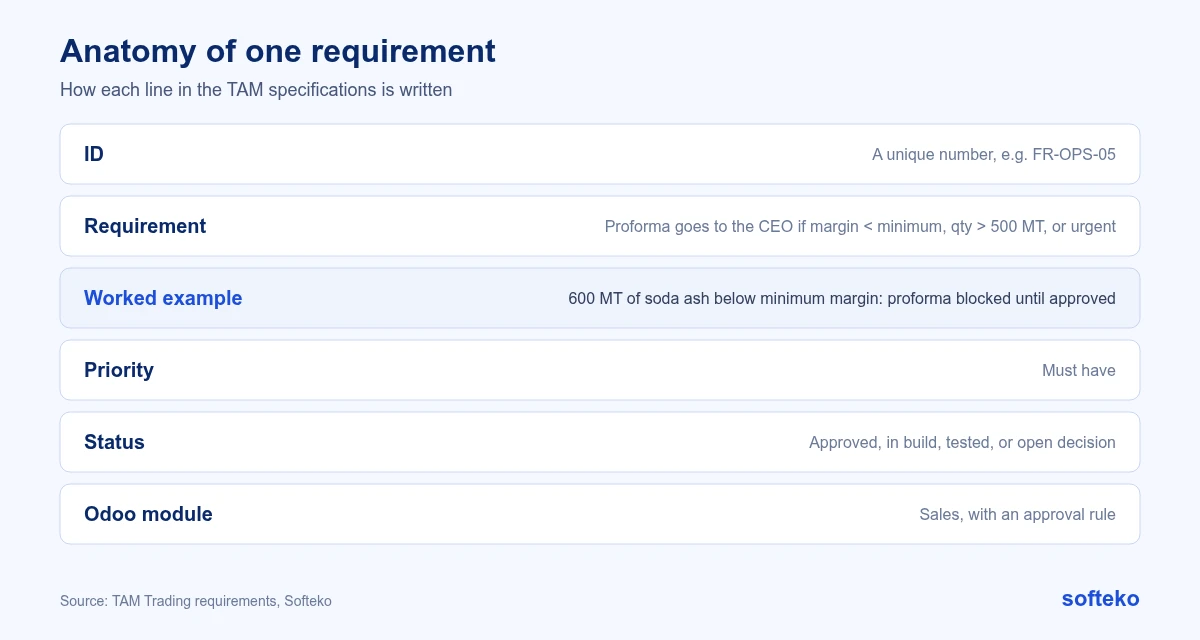
Every requirement is numbered and tracked. Each one has an ID, a short description, a priority and a status. When a question comes up during testing, everyone can point to the same line.
Hard rules come with a worked example. For instance, TAM’s approval rule says a proforma goes to the CEO if the margin is below the minimum, the quantity is over 500 MT, or the deal is urgent. The specification adds an example: a salesperson wants to sell 600 MT of soda ash below the minimum margin, so the system blocks the proforma until management approves. A sentence like that removes arguments later.
Each specification also says clearly what is out of scope. For example, TAM’s Sales specification excludes automatic data extraction from RFQs (manual entry is required), and the Finance specification excludes treasury management and bank API integration.
Step 4: record what has not been decided
Where TAM had not decided a policy, we recorded it as an open decision rather than guessing. The Finance specification lists 25, including late-payment interest pass-through, Free Zone input VAT recovery and payment holds during disputes. We list the ones that cause most trouble in mistakes we plan for.
The scope also grew as teams reviewed the first versions. Between 5 and 23 December 2025, the Supply Chain team added 13 requirements, including vendor validation, document expiry alerts, MSDS version control and consignee stock.
An open decision list needs an owner for each item and a date by which it must be decided. Otherwise the decisions get made by whoever configures the screen.
If you are about to start an Odoo project, we can help you write requirements your team and your partner read the same way.
After sign-off: how delivery runs
Once requirements are signed off, our delivery follows the same pattern on each project:
- Configuration, customisation and development, in two-week sprints, with a review at the end of each sprint.
- Data migration, using templates shared early so the client can clean data in parallel.
- Training and user acceptance testing, with user manuals.
- Go-live and stabilisation, followed by an annual maintenance and support agreement.
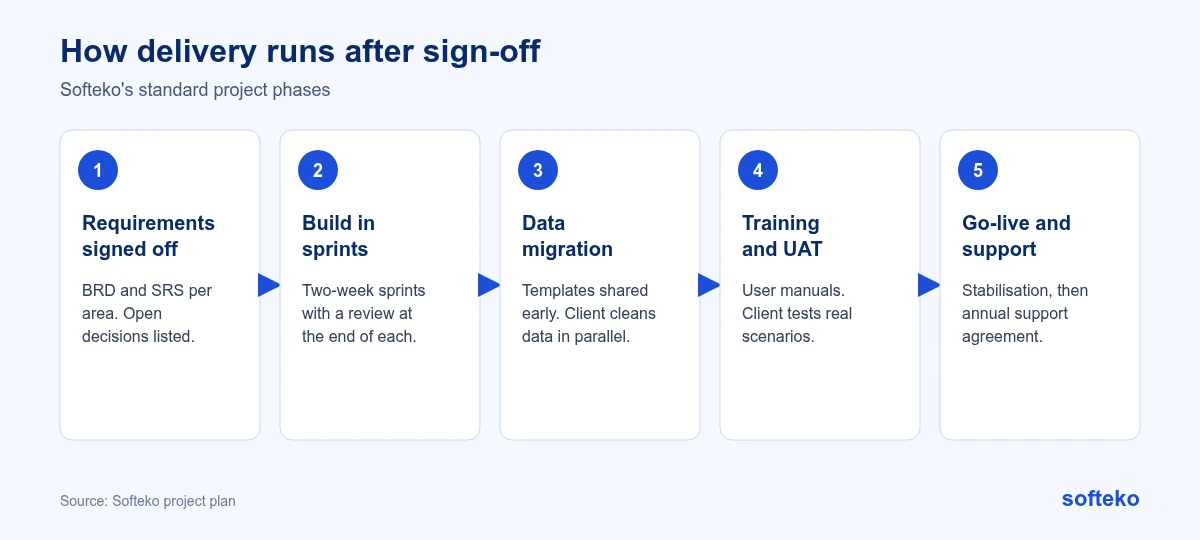
New requirements raised after sign-off go into a later phase. They are estimated and scheduled separately, through a change request, so the agreed scope, cost and timeline stay clear. Data is planned in parallel; see data migration.
From requirements to an estimate
Once requirements are numbered, each one can be tagged as standard Odoo, configuration or development. That tagging is what makes an estimate reliable. A requirement marked “development” gets its own effort estimate, and the client can decide whether it is worth the cost or whether a standard process will do.
The same tags also guide the plan: standard and configured items are built first, so users see working screens early, while development items follow in later sprints.
All at once or in phases?
| Factor | All at once | In phases |
|---|---|---|
| Time to finish | Shorter | Longer |
| Disruption at go-live | Higher | Lower |
| Training load | Everyone at the same time | Spread out |
| Risk of widespread issues | Higher | Lower |
| Suits | One location, simple processes | Several companies, countries or warehouses |
For a multi-entity trader like TAM, a phased rollout spreads the risk. The cost is a longer period with some processes in Odoo and some outside it, which needs temporary bridges between the two.
The first 90 days after go-live
| Days 1 to 30 | Days 31 to 60 | Days 61 to 90 |
|---|---|---|
| Fix critical issues | Simplify approvals that slow work down | Track quotation turnaround |
| Support users daily | Refine reports | Track stock accuracy |
| Confirm data accuracy | Adjust access rights | Track collections |
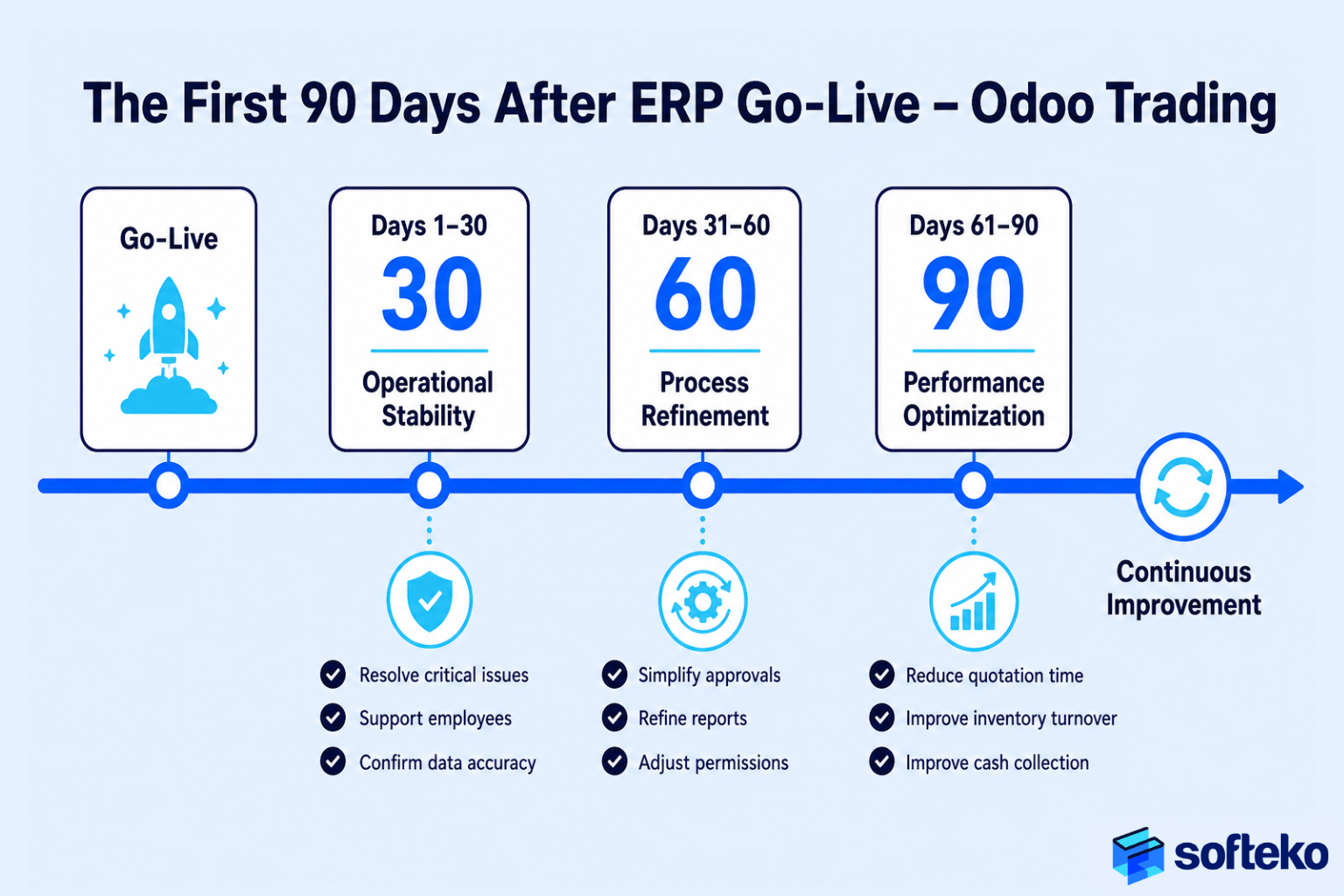
The first month is about stability, not new features. Requests for changes are collected and reviewed after that.
Multi-company choices to make early
TAM runs three entities in one database. In Odoo 19, users switch between companies from the company menu. Products and contacts are shared across companies by default, while values such as product cost are company-specific [1]. On Odoo’s pricing, multi-company needs the Custom plan rather than the Standard plan [2]. Both points affect the requirements and the budget, so settle them in the first weeks. HR is a good example of a multi-entity decision: one HR setup across three countries.
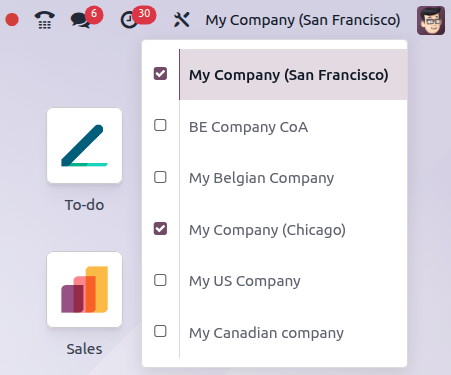
Decide early which records are shared (products, customers, suppliers) and which belong to one company (prices, costs, bank accounts, taxes). Intercompany sales, such as TAM’s UAE to KSA shipments, also need their own rules.
If you are planning an implementation
- Collect your current flowcharts and forms before the first workshop.
- Hold sessions per department, not one meeting for everyone.
- Ask for numbered requirements with priorities, statuses and worked examples.
- Make sure out-of-scope items are written down.
- Keep open decisions on a separate list, each with an owner and a date.
- Agree how new requirements after sign-off will be handled.
- Decide early whether you go live all at once or in phases.
For budgeting, see what drives implementation cost.
FAQ
What is the difference between a BRD and an SRS?
The BRD describes what the business needs, in business language. The SRS turns that into numbered requirements the team can build and test.
How long does the requirements stage take?
It depends on scope and how quickly decisions are made. For TAM’s five areas, it ran from November 2025 to January 2026.
Can several companies run in one Odoo database?
Yes. Odoo 19 supports multiple companies with shared and company-specific records [1].
What happens to requests that come up after sign-off?
They go through a change request: estimated, approved and scheduled into a later phase.
Should we go live with everything at once?
Only if the business is in one location with simple processes. Multi-company or multi-country businesses usually do better in phases.
Start with your own process
If you are preparing an Odoo project, we start where we started with TAM: your current process and forms. Read more about our Odoo implementation service.
References
[1] Odoo, Multi-company, Odoo 19.0 documentation. https://www.odoo.com/documentation/19.0/applications/general/companies/multi_company.html
[2] Odoo, Pricing. https://www.odoo.com/pricing
[3] Screenshot: Odoo S.A., Odoo 19.0 documentation, Multi-company, licensed under CC BY-SA 4.0 (https://creativecommons.org/licenses/by-sa/4.0/). https://www.odoo.com/documentation/19.0/applications/general/companies/multi_company.html